AI assistant
In NanoTracker for Windows and macOS.
“Where is the Rossi job?”
Just ask Claude.
NanoTracker connects to Claude, the AI app you may already have on your computer. From then on you ask about your disks in plain words, in any conversation: looking it up in the catalog is his job.
Three steps, once and for all
You connect it once and it stays connected. After that there is nothing special to open.
Connect Claude
In NanoTracker: Connectors → AI assistant → Connect. If you do not have Claude, the same screen takes you to the download.
Open any conversation
No special place, no need to mention NanoTracker. A chat like any other.
Ask
When Claude consults the catalog a line with the NanoTracker mark appears: that is how you know it is looking at your disks. The first answer can take a couple of minutes; the ones after that are quick.
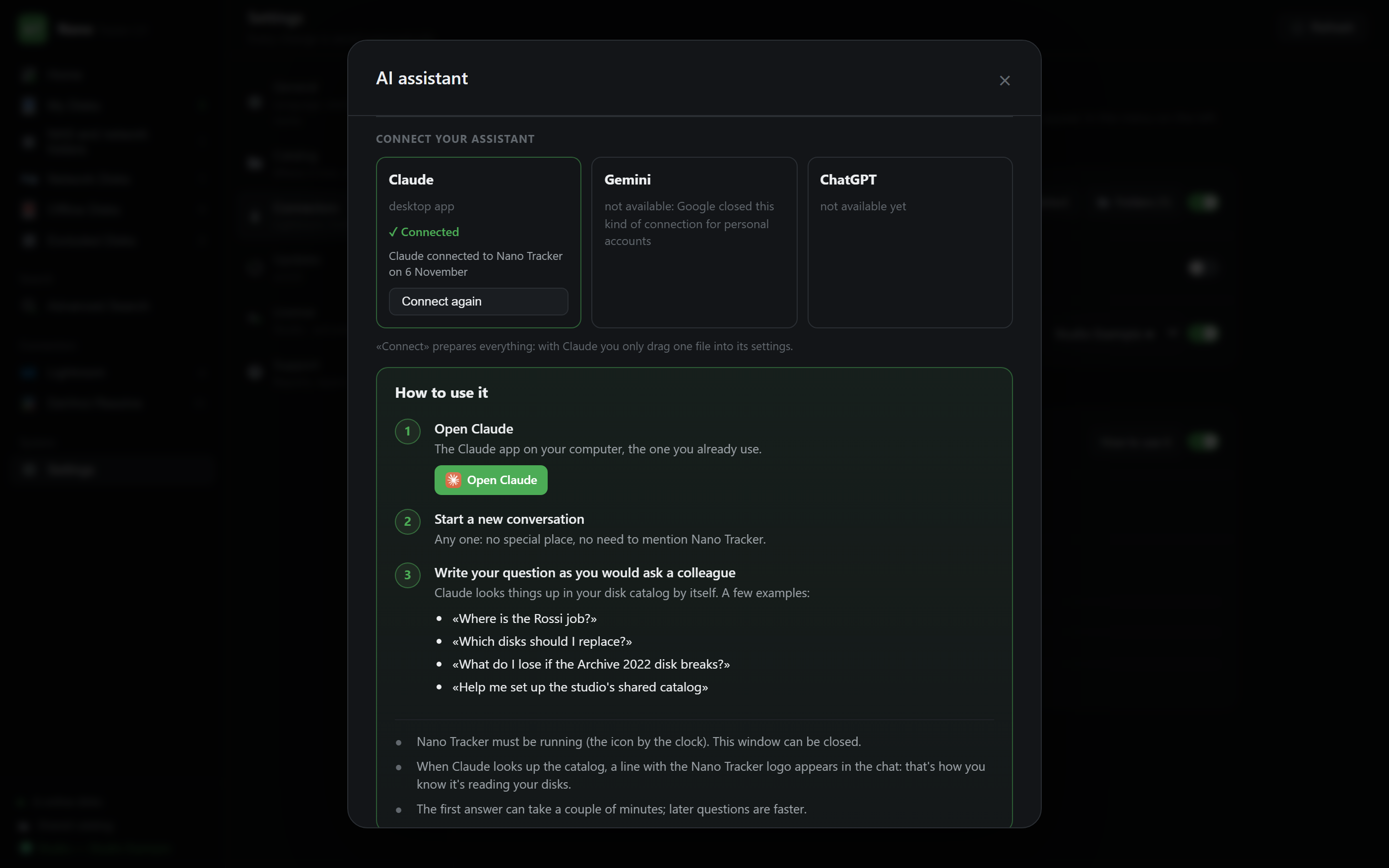
How it looks inside NanoTracker.
What you can ask
These are not commands to learn: they are ordinary questions. They work, and they are the kind of thing a studio asks itself every day.
“Where is the Rossi job?”
It tells you which disk it is on and in which folder, even if that disk is switched off in a drawer right now.
“What do I lose if the Archive 2022 disk dies?”
It looks at what is on that disk and how much of it also exists somewhere else. Whatever it cannot find anywhere else is the answer.
“Which disks should I replace?”
It reads what each disk says about itself — bad sectors, hours of work, wear — and tells you in plain English. How disk health works.
“Help me set up the studio’s shared catalog.”
It looks at how your network is set up, asks which NAS you have and tells you what to press, one step at a time. If you would rather read, there is the illustrated guide.
Can Claude see my files?
It is the first thing everybody asks, and it is the right question. The answer is no, and it is worth explaining why.
It sees the catalog, not the contents
NanoTracker hands over what it has: folder names, how much space they take, which disk they are on, when that disk was last seen. Your files are not opened, not read and not copied anywhere — not by him, not by us.
It can only look
Every action NanoTracker makes available is read-only. Not one of them deletes, moves or changes anything: even if it wanted to, it could not.
Passwords do not leave
Before answering, NanoTracker strips passwords, the license key and your email address out of every reply, and shortens the paths that contain your user name. Those never reach Claude, not even by accident.
You can see what it asked, and you can switch it off
The Assistant panel lists the recent requests, one per line. And there is a switch: turned off, any question about the catalog gets a no.
The subscription is yours
You use your own Claude account, not ours. The conversations stay between you and him: we do not see them and we do not pay anything on your behalf.
What you need
Not much, but it is worth saying in full.
The Claude app on your computer
The one from claude.ai, for Windows or for macOS. For now the connection works with Claude.
NanoTracker running
The icon by the clock has to be there. The window you can close: there is no need to keep it open.
For studio questions, a Studio license
Questions about your own disks work with any license. The ones about the shared catalog — which computers use it, where it is, how to connect another one — belong to the Studio license.
Common questions
Can Claude read my files or my photos?
No. NanoTracker only hands over the catalog: folder names, sizes, which disk they are on and when that disk was last seen. It does not open your files, does not read them and does not copy them anywhere. Every action is read-only: none of them can delete, move or change anything.
Do I have to pay for another subscription?
Not to us. You use the Claude app already on your computer, with your own account: NanoTracker simply answers its questions about the catalog. We never see your conversations.
Does it work with ChatGPT or Gemini?
Not for now: it works with Claude. Gemini is not available because Google has closed this kind of connection to personal accounts.
What happens if I quit NanoTracker?
Claude tells you: questions about the catalog answer that NanoTracker needs opening. The window itself you can close whenever you like, as long as the program stays running - the icon by the clock.
You already have the catalog. Now you can talk to it.
Free trial — pay once, no subscription.
Download NanoTracker