Smart search
In NanoTracker for Windows and macOS.
Write the way you speak.
It works out the rest.
“Jobs last summer”. “Rossi 2023”. “July jobs on the Archive disk”. These are not commands to learn: it is the sentence you would say to a colleague, and NanoTracker shows you what it made of it before answering.
What it looks like
Results appear as you type, from the third letter, without pressing Enter. Above them sits a line saying what NanoTracker understood: if it got something wrong, remove that piece with one click.
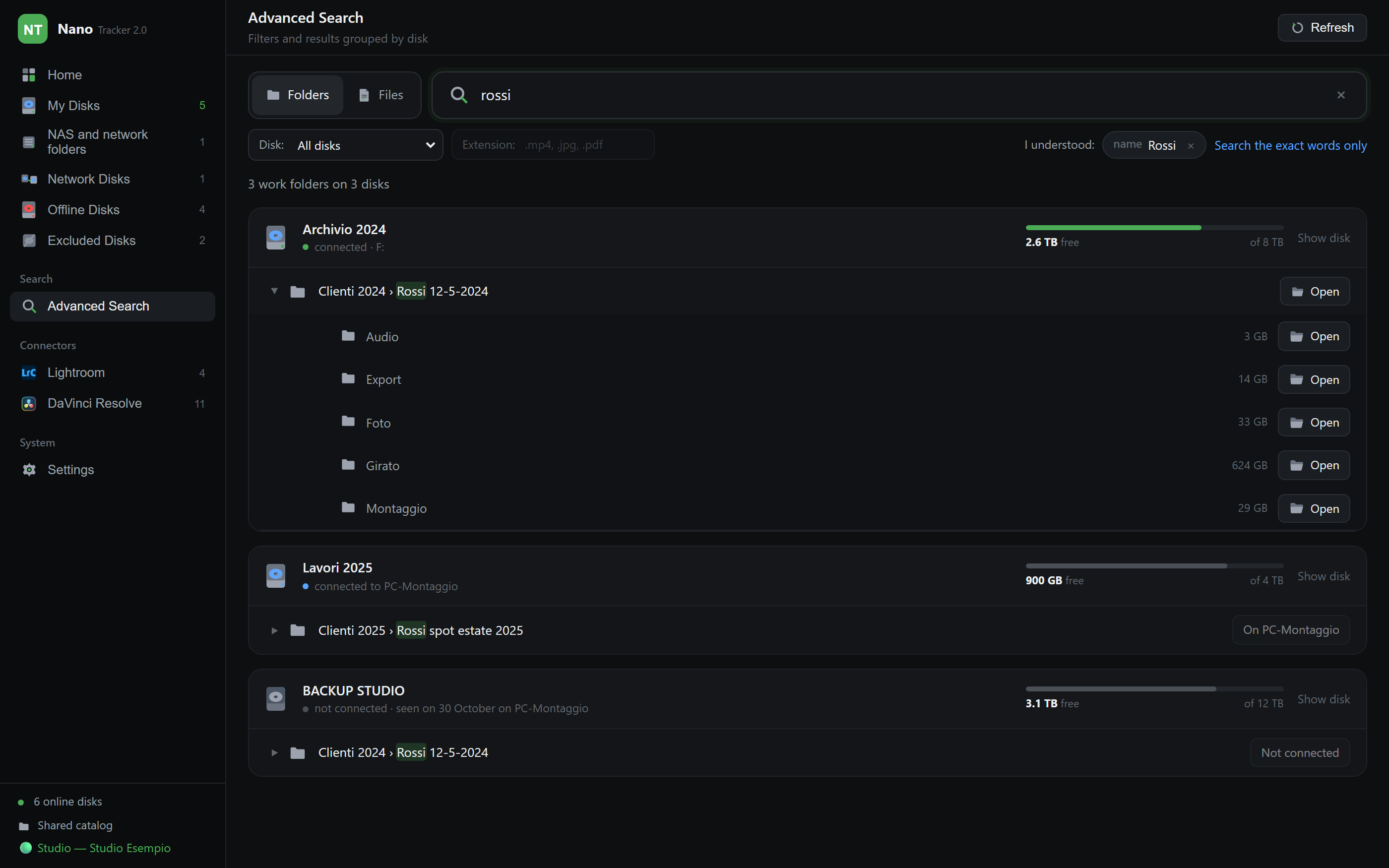
Results are grouped by disk, and each one says whether it is connected, and where and when you last saw it.
What it understands
Four things, and they are the ones people actually say about an archive.
Names, even mistyped
If a word does not exist in the catalog, it takes the nearest one that does and tells you. One mistake up to seven letters, two from eight up; below four it corrects nothing, because that would be guessing.
Dates hidden in folder names
Nobody writes dates the same way, and NanoTracker reads them anyway: 23-8-2023, 18.7.25, 13 07 2021, 20250718, 230823, 18 July 2026. And it does not read dates where there are none: ENK4.1_23 is not 4 January 2023.
Periods said the way you say them
“Last summer” is June, July and August of last year. A month with no year is the most recent one past: in November, “July” is this year’s July. “Last year” is last year.
Which disk, and whether it is connected
“On the Archive disk” narrows it to that disk. “Connected only” leaves out the ones in the drawer, for when you need something right now.
It tells you why, too
Searching by period has a problem nobody mentions: not every folder has a date in its name. Hiding those would be convenient and wrong, because the one you want might be among them.
The ones that match fully
Name and period both fit: they come first, each with the date NanoTracker read in the name.
The ones that half match
The client’s name is there, but the folder name carries only the year, not the month. They are not the answer, but they could be: they sit right below, declared for what they are.
The ones with no date
Folders whose name does not say when. They come after, and they are not thrown away.
And the ones you do not care about
Program caches, previews, working projects, and folders matching only part of what you typed: they stay at the bottom, closed, with a count. One click opens them.
From nine seconds to a blink
On a real studio catalog — half a million folders on a modest NAS — searching for a name meant waiting.
8.6 seconds → 0.1-0.3 seconds
Looking for part of a word inside half a million rows means reading all of them, and a small NAS reads them off the disk every time. NanoTracker now keeps a copy of the paths alone on your computer, built for searching, and keeps it in step by itself: it only re-fetches the disks that changed.
The real catalog stays where it is and nobody touches it: the copy is only for searching. If it is not ready yet, search works as it did before — you notice nothing, except that it becomes quick.
Common questions
Do I have to learn a syntax or commands?
No. You write the way you speak: "jobs last summer", "rossi 2023", "july jobs". NanoTracker shows above the results what it understood of your sentence, piece by piece, and any piece can be removed with one click to widen the search.
How does it know when a job was shot?
It reads the date written in the folder name, in the ways studios actually write them: 23-8-2023, 18.7.25, 13 07 2021, 20250718, 230823, 18 July 2026. And it is careful not to read dates where there are none: ENK4.1_23 is not 4 January 2023.
What if I mistype a name?
If a word exists nowhere in the catalog, NanoTracker takes the nearest one that does and says so. It tolerates one mistake in words up to seven letters and two from eight up; below four letters it corrects nothing, because that would be guessing.
Why was it slow before?
Because looking for part of a word inside half a million rows means reading all of them, and a modest NAS reads them off the disk every time. NanoTracker now keeps a copy of the paths alone on your computer, built for searching, and keeps it in step by itself. On the test catalog: from 8.6 seconds to 0.1-0.3.
The disk is in a drawer. The answer comes anyway.
Free trial — pay once, no subscription.
Download NanoTracker